Sales professionals often face an overwhelming challenge: managing a high volume of leads without timely follow-ups. This struggle can lead to missed opportunities, and ultimately, lost sales. Enter email follow-up automation, a powerful solution that not only streamlines communication but also enhances efficiency for sales teams. By automating follow-up emails, you can increase response rates, improve customer engagement, and boost productivity.
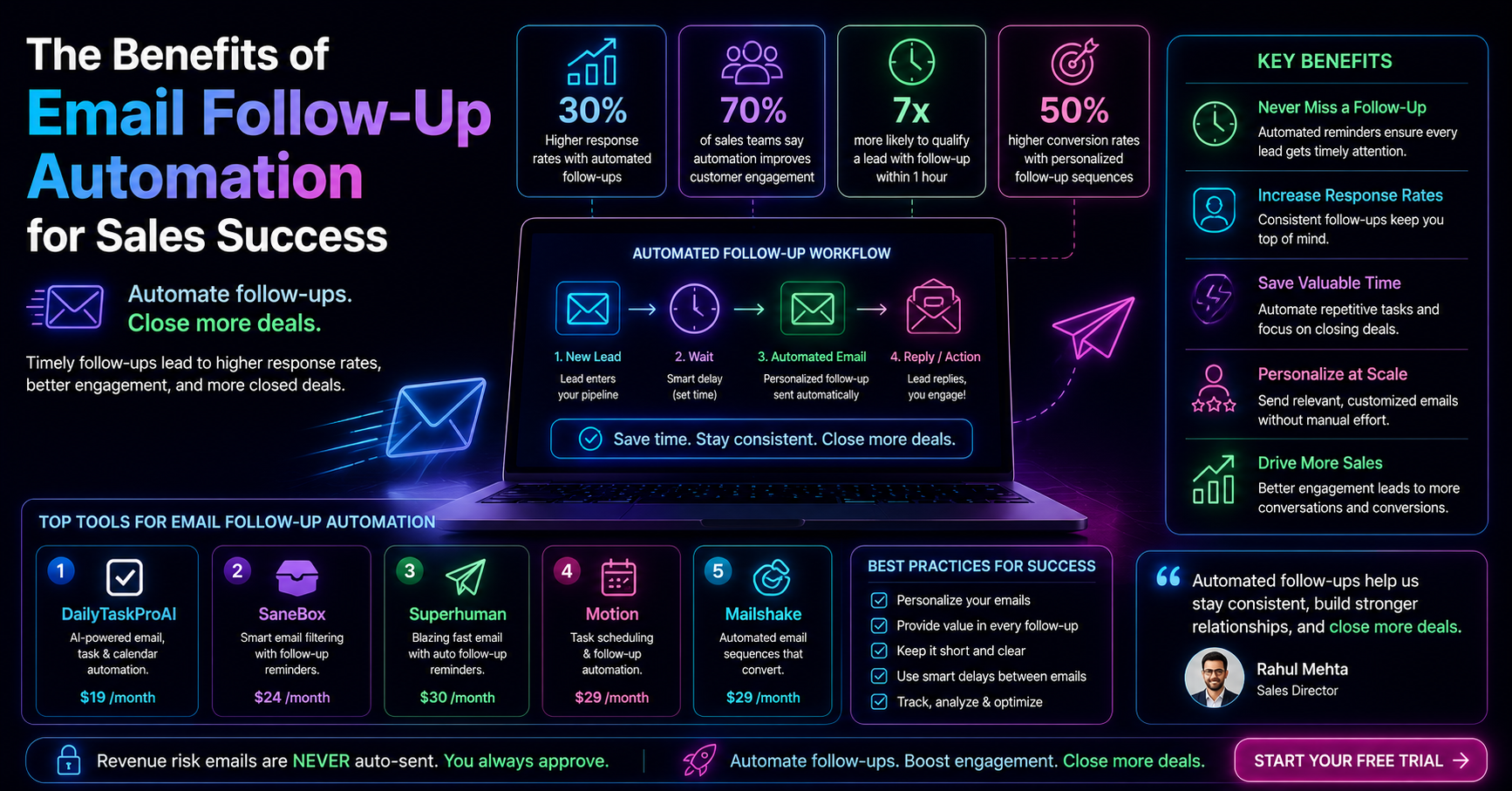
In fact, sales professionals who automate their follow-up emails see a remarkable 30% increase in response rates. It's no wonder that around 70% of sales teams believe that automated follow-ups improve customer engagement. With the right tools and strategies, you can transform your sales process and maximize your success.
Table of contents
Understanding Email Follow-Up Automation
Email follow-up automation refers to the use of software tools that automatically send follow-up emails to prospects after an initial contact. This process ensures that potential customers receive timely communication without requiring manual effort from sales professionals. Automation is crucial in today’s fast-paced sales environment, where timely responses can significantly impact lead qualification. Businesses that follow up within the first hour of contact are seven times more likely to qualify the lead.
Moreover, implementing email follow-up automation can help sales teams manage their time effectively, allowing them to focus on closing deals rather than getting bogged down in routine tasks. The automation streamlines communication, enhances engagement, and ultimately leads to improved sales outcomes.
How Email Follow-Up Automation Improves Sales
Automating your follow-up emails can lead to several key benefits:
Increased Response Rates: As mentioned, sales professionals who automate follow-ups experience a 30% boost in response rates. This is crucial for maintaining momentum in the sales process.
Time Savings: By automating repetitive tasks, sales teams can allocate their time to high-value activities. For instance, instead of spending hours crafting individual emails, they can focus on nurturing relationships and closing deals.
Enhanced Personalization: Automated systems can be programmed to send personalized messages based on the prospect's behavior or information, leading to improved engagement. Personalized email follow-up sequences can increase conversion rates by up to 50%.
To illustrate, consider a scenario where a sales representative receives multiple inquiries from potential clients. Without automation, they might struggle to respond promptly, leading to missed opportunities. With email follow-up automation, they can set up a system that sends a personalized response immediately, keeping the conversation alive and increasing the chances of conversion.
Experts agree that timely and personalized follow-ups are critical for closing sales.
However, while automation offers immense benefits, it's essential to remain aware of its limitations. Over-reliance on automation can sometimes lead to generic interactions. Therefore, it's important to combine automation with a personal touch whenever possible.
Best Tools for Automating Follow-Up Emails
There are several effective tools available for automating email follow-ups. Below are some notable options:
Tool Features Best For Pricing DailyTaskProAI AI Decision Engine, AI Auto-Reply, Smart Calendar & Auto-Scheduling Small to medium-sized teams $19/month SaneBox Email sorting, reminders Solo entrepreneurs $24/month Superhuman Email tracking, scheduling High-performance sales teams $30/month Motion Task management, scheduling Busy professionals $29/month
Among these options, DailyTaskProAI stands out due to its comprehensive features, including AI Decision Engine, AI Auto-Reply, and Smart Calendar & Auto-Scheduling. This combination allows you to score emails, draft contextual replies, and schedule tasks seamlessly, making it an excellent choice for small to medium-sized teams looking to enhance their sales follow-up process.
Creating Effective Follow-Up Email Templates
Crafting effective follow-up email templates is crucial for maximizing engagement with prospects. Here are some tips on how to create templates that resonate:
Personalize Your Messages: Always include the prospect's name and reference specific details from your previous conversation. This shows that you value their individual needs.
Be Concise: Keep your emails short and to the point. Prospects are busy, so make sure your message is easy to read quickly.
Include a Clear Call to Action: Make it easy for the prospect to take the next step, whether it's scheduling a meeting, replying to your email, or visiting a landing page.
For example, consider a follow-up email to a prospect who expressed interest in your product:
"Hi [Prospect's Name], I hope you’re doing well! I wanted to follow up on our last conversation about [Product]. If you have any questions or would like to schedule a time to discuss further, please let me know. Looking forward to hearing from you!"
Using templates like this can save time while ensuring that you maintain a personal touch. However, remember to adjust the template as necessary to fit the context of each conversation.
The Role of Task Prioritization in Sales Follow-Ups
Task prioritization is essential for sales professionals managing multiple leads. It helps them focus on high-value follow-ups while ensuring nothing slips through the cracks. For instance, using an AI Decision Engine can help you score emails based on urgency and revenue risk, allowing you to prioritize follow-ups that matter most.
Imagine a sales team that has just launched a new product. They receive numerous inquiries and leads. Instead of treating every lead equally, they can use task prioritization to determine which leads to pursue first based on their scoring system. This way, they can maximize their chances of converting high-potential leads while managing their time effectively.
Pros: Increases focus on high-impact tasks, reduces overwhelm, and improves efficiency.
Cons: Requires consistent effort and discipline to maintain an effective prioritization process.
This approach is best suited for sales teams that handle a significant number of leads daily and need a structured way to manage their follow-ups effectively.
Scheduling Follow-Up Meetings with Smart Calendar & Auto-Scheduling
One of the biggest challenges in sales is scheduling follow-up meetings without conflicts. This is where Smart Calendar & Auto-Scheduling comes into play. This feature automatically reads your emails, detects meetings and deadlines, checks your calendar availability, and schedules tasks into free slots within your working hours.
For instance, if a prospect is interested in a demo of your product and suggests a time, the Smart Calendar & Auto-Scheduling feature can check your calendar and automatically propose the next available time slot. This reduces the back-and-forth communication and ensures you don’t miss out on valuable opportunities.
Additionally, if a conflict arises, this feature can detect it and suggest alternative meeting times, making it easier to manage your schedule. This is especially useful for sales teams that juggle multiple prospects and meetings daily.
FAQ: Common Questions About Email Follow-Up Automation
1. How does email follow-up automation improve sales?
Email follow-up automation enhances sales by ensuring timely and personalized communication with prospects. Automated systems can send follow-ups immediately after a lead expresses interest, increasing the likelihood of conversion. Additionally, automation frees up time for sales professionals to focus on building relationships rather than handling repetitive tasks.
2. What are the best tools for email follow-up automation?
The best tools for automating email follow-ups include DailyTaskProAI, which integrates AI features for email scoring, auto-replies, and scheduling. Other options like SaneBox and Superhuman offer various functionalities, but DailyTaskProAI stands out with its comprehensive approach to managing follow-ups, tasks, and calendar scheduling.
3. Can email follow-up templates be personalized?
Yes, personalization is key to effective follow-up emails. Including the prospect's name and referencing specific details from past conversations can significantly enhance engagement. Automated tools can also help customize templates based on recipient behavior and preferences.
4. How can I track the effectiveness of my follow-up efforts?
Tracking the effectiveness of follow-up efforts can be done through analytics provided by email automation tools. These tools often offer insights into open rates, response rates, and engagement metrics, allowing sales teams to refine their strategies based on data-driven insights.
5. Is there a risk of sounding too robotic with automated emails?
While automation can occasionally lead to generic interactions, it's essential to balance automation with a personal touch. Customizing templates and being mindful of tone can help maintain a conversational style, ensuring that emails feel genuine and engaging.
Boost Your Sales Efficiency with DailyTaskProAI
Automating your follow-ups is no longer a luxury but a necessity for sales success. With DailyTaskProAI, you can streamline your email management and task prioritization while leveraging Smart Calendar & Auto-Scheduling for seamless meeting scheduling. Revenue risk emails are NEVER auto-sent. You always approve.
Start automating your follow-ups today with DailyTaskProAI to boost your sales efficiency and engagement with prospects.
Resources & Further Reading
External Resources
Harvard Business Review, Insights on sales strategies and automation.
McKinsey, Research on the impact of automation on sales productivity.
Statista, Statistics on email marketing effectiveness and trends.