Most people think managing GST emails is just about sorting through their inbox. The reality is far more complex. Missing GST deadlines can lead to penalties, disrupted cash flow, and damaged business relationships. Effective GST email management is essential for any business.
Consider this scenario: You receive several emails regarding GST invoices, payment reminders, and compliance notifications. If you overlook a single email, you risk missing a crucial deadline. This can lead to financial repercussions and unnecessary stress. The stakes are too high to be disorganized.
Table of contents
Method 1: Understanding GST Email Management
GST email management is about more than just deleting unwanted messages. It involves a clear strategy to ensure that all necessary emails are prioritized and addressed promptly. The importance of managing these emails effectively cannot be overstated. The consequences of neglecting GST emails can lead to missed deadlines and financial penalties.
For example, imagine you’re a small business owner. You receive an email about an upcoming GST filing deadline. If you miss it because it got buried in your inbox, you risk incurring fines. To avoid this, you need to recognize the value of managing your GST-related emails.
Pros: Helps avoid penalties, improves organization, reduces stress.
Cons: Requires initial setup and ongoing diligence.
This method is best for small business owners and teams that handle multiple GST-related emails regularly. It's about creating a proactive approach to your inbox, rather than a reactive one.
Method 2: Organizing Your GST Emails
Organizing your GST emails is a fundamental step that can drastically reduce the time you spend searching for critical information. Start by creating specific folders or labels for different categories of GST emails, such as invoices, payments, and compliance notifications.
For instance, you could have a folder labeled "GST Invoices" where you store all emails related to incoming invoices. This way, when it’s time to reconcile your accounts, you know exactly where to look. You can also color-code your emails based on urgency, which visually cues you into what needs immediate attention.
Pros: Saves time, reduces clutter, enhances clarity.
Cons: Initial setup can be time-consuming.
This method works best for individuals who receive a high volume of GST emails or those who manage multiple clients. A well-structured inbox can prevent important emails from getting lost.
Method 3: Setting Up GST Deadline Reminders
Setting up reminders is crucial in managing GST deadlines effectively. You can use calendar tools like Google Calendar or Outlook Calendar to create reminders for important dates. This ensures that you stay on track with filing deadlines and payment schedules.
For example, when you receive an email notification about an upcoming GST payment, immediately add it to your calendar with a reminder set for one week prior. This gives you ample time to prepare and ensures you won’t forget. Integrating your calendar with your email client can also streamline this process.
Pros: Enhances accountability, reduces the risk of missing deadlines.
Cons: Relies on maintaining an updated calendar.
This strategy is ideal for anyone involved in finance or operations, particularly those who juggle multiple responsibilities. A reminder system can be a powerful ally in maintaining compliance.
Method 4: Tracking GST Invoices Efficiently
Tracking GST invoices is another critical component of effective GST email management. It’s essential to maintain a checklist of all invoices you expect to receive and their due dates. Software tools can assist in automating this process.
For instance, you could use accounting software that integrates with your email to automatically pull in invoice data. This enables you to track payments and due dates without manually sifting through emails. By maintaining a checklist, you can also confirm that you’ve received all necessary invoices before deadlines approach.
Pros: Increases accuracy, provides a clear overview of financial obligations.
Cons: Requires familiarity with software tools.
This method is especially beneficial for finance teams or small business owners who manage numerous invoices. Having a clear tracking system can prevent cash flow disruptions.
Method 5: Automating GST Email Replies
Automating replies to GST-related emails can save you significant time. Using tools that draft responses in your voice allows you to maintain consistency in communication. However, it's crucial to remember that you should always approve any auto-generated replies before they are sent.
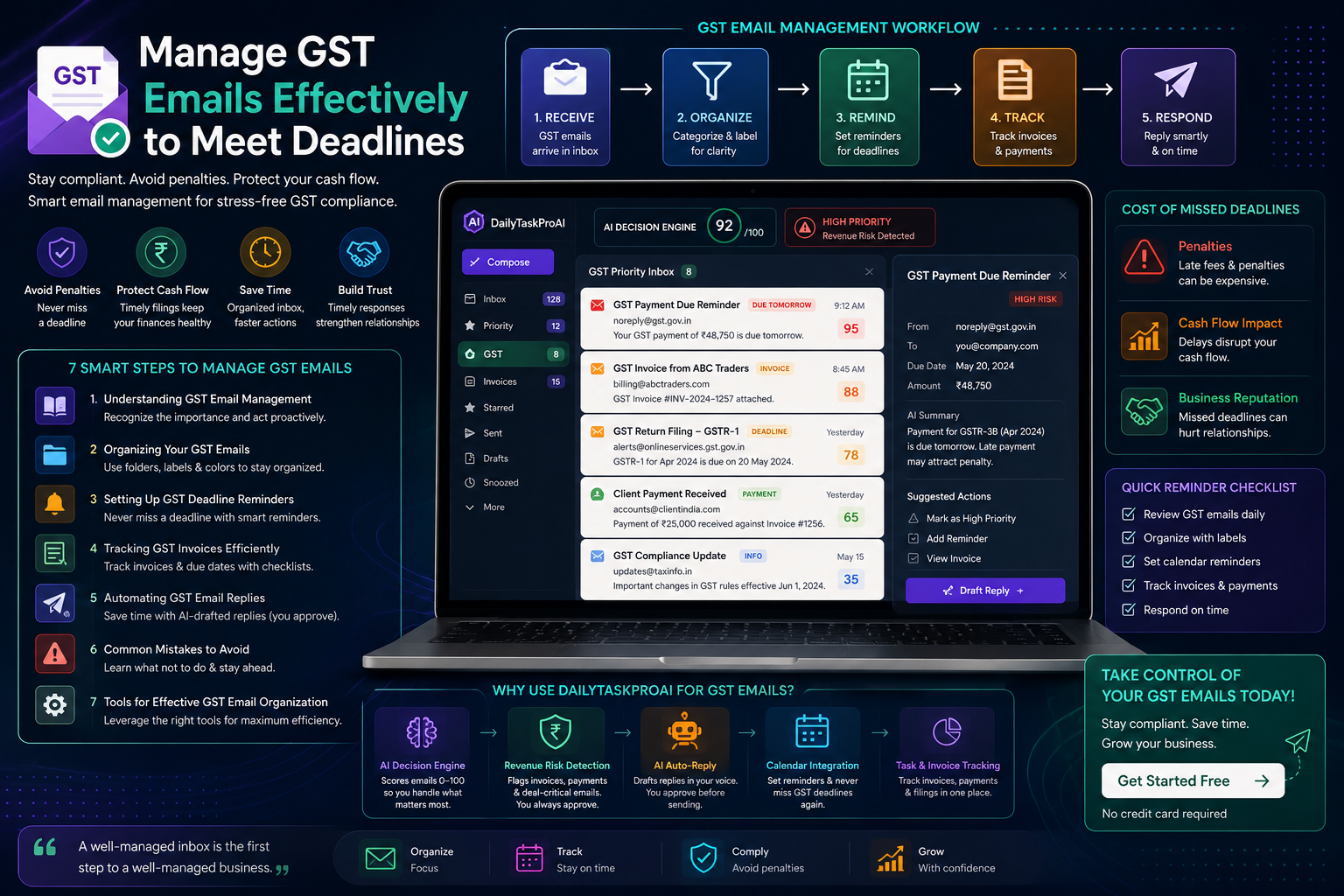
Consider a scenario where you receive repeated inquiries about GST filing procedures. With an automated reply feature, you can set up a response that addresses these questions. The AI Auto-Reply feature in DailyTaskProAI drafts these replies, which you can review before sending. This saves you from having to type out the same message repeatedly.
Pros: Saves time, maintains consistent communication.
Cons: Risk of miscommunication if not reviewed.
This method is best for small teams or solo founders inundated with repetitive queries. Automation can help you focus on more critical tasks while ensuring timely responses.
Method 6: Common Mistakes in GST Email Management
Understanding common pitfalls can help you avoid costly mistakes in GST email management. One frequent error is failing to categorize emails properly, which can lead to missed deadlines. Another mistake is not setting reminders for critical dates, resulting in last-minute scrambles.
“The best way to manage your emails is to treat them like tasks that require attention, rather than just messages that clutter your inbox.”
For example, if you receive an invoice but do not label it correctly, you might not see it when it’s time to pay. This can result in penalties for late payments. To counteract this, regularly review your email organization and reminder systems.
Pros: Helps improve efficiency, reduces stress.
Cons: Requires ongoing diligence.
Method 7: Tools for Effective GST Email Organization
Several tools can assist in managing GST emails effectively. DailyTaskProAI stands out as it not only helps organize emails but also prioritizes tasks and automates responses. Its AI Decision Engine scores emails based on urgency, ensuring you handle critical emails first.
For example, if an email regarding a late payment arrives, DailyTaskProAI will flag it high on your priority list. You can also use calendar integrations, invoice management software, and task management tools to create a comprehensive system for managing GST emails.
Pros: Comprehensive management, improved efficiency.
Cons: May require a learning curve.
This method is best for small teams or solo founders looking to streamline their email management processes. With the right tools, you can save time and avoid costly mistakes.
FAQ
What is GST email management?
GST email management refers to the strategies and tools used to organize, track, and respond to emails related to Goods and Services Tax. Effective management helps ensure compliance with deadlines and minimizes the risk of penalties.
How can I set reminders for GST deadlines?
You can set reminders using calendar tools like Google Calendar or Outlook. Simply create events for important dates related to GST filings and payments, and set reminders to alert you in advance.
What common mistakes should I avoid in GST email management?
Common mistakes include failing to categorize emails properly, not setting reminders, and neglecting to review incoming invoices. Being aware of these pitfalls can help you establish more effective management practices.
How can DailyTaskProAI assist with GST email management?
DailyTaskProAI offers features like the AI Decision Engine, which prioritizes your emails based on urgency. It also allows for automated replies that you can approve before sending, ensuring consistent and timely communication. Revenue risk emails are NEVER auto-sent. You always approve.
What tools can I use for tracking GST invoices?
You can use accounting software that integrates with your email to track invoices automatically. Additionally, maintaining a checklist can help you ensure that all invoices are accounted for before deadlines.
Start Managing Your GST Emails Effectively with DailyTaskProAI
Effective GST email management is crucial for avoiding penalties and ensuring smooth business operations. With DailyTaskProAI, you can streamline your email organization, prioritize tasks, and automate responses, all while maintaining control over your communications. Start managing your GST emails effectively with DailyTaskProAI today.
To learn more about how DailyTaskProAI can help you, visit our homepage or get started free.