On this page
Most people do not have an email problem. They have an order problem. The right message is in the inbox somewhere, but it is buried under newsletters, cc threads, and replies that do not need a reply. Learning how to prioritize emails automatically is really about teaching your inbox to surface the few messages that move money, deadlines, and relationships to the top.
Below are the four methods that actually work in 2026, from the simplest built-in settings to a full AI decision engine. Each one has a place, and we are honest about where each falls short.
Method 1: Native Gmail and Outlook Priority Tools
Gmail and Outlook both ship with built-in email prioritization. Gmail uses Priority Inbox and importance markers that learn from who you open and reply to. Outlook uses Focused Inbox to split important mail from the rest. Both are free, need no setup, and improve over time. They are the fastest way to start.
The strength here is zero effort. You turn on Priority Inbox or Focused Inbox and the provider does the sorting. For a personal inbox with predictable patterns, this often handles 80 percent of the noise.
The limit is that these tools sort by engagement, not by stakes. They learn that you open mail from your manager, so that rises. But a first-time email from a new client about a late payment looks like a stranger, so it can land in the wrong bucket. There is no concept of revenue risk, no deadline awareness, and no priority score you can see or tune. You get a binary "important or not," not a ranking.
Method 2: Manual Rules, Labels, and Folders
Manual rules let you prioritize email automatically by matching fixed conditions. You write a rule like "if the subject contains invoice, apply a red label" or "if it is from this domain, move it to a Clients folder." Gmail filters and Outlook rules both do this. Once set, they run on every incoming message with no further work.
Rules are powerful because you control them exactly. They are predictable, instant, and great for mail that always looks the same, such as receipts, alerts, and newsletters. If a sender or subject pattern never changes, a rule is the cleanest fix.
The trade-off is maintenance and brittleness. Rules only fire on the exact words you set. An invoice that says "statement of account" instead of "invoice" slips through. A deal that goes quiet sends no email at all, so no rule can catch the silence. You end up with dozens of rules to maintain, and they still miss anything phrased in a new way. Manual rules sort by keyword, not by meaning.
See Your Inbox Scored in Three Minutes
Connect Gmail or Outlook and watch every email get an AI Score by urgency, revenue risk, deadline, and sender. No credit card required.
Method 3: VIP Sender Rules
VIP sender rules prioritize email automatically based on who sent it. You mark specific people or domains as important, and mail from them jumps to the top or triggers a notification. Apple Mail has VIPs, Outlook has favorites, and most clients support a starred-sender list. It is a focused version of manual rules aimed at people, not keywords.
This works well when your priorities map cleanly to a short list of senders, like your three biggest customers or your co-founder. It is simple to set up and easy to reason about. If a name on your list emails, you see it first.
The weakness is that importance is not only about the sender. Your top customer might email you a calendar invite that can wait, while an unknown address sends a contract that needs a signature today. VIP rules treat every message from a person the same, regardless of what the message actually says. They also miss new senders entirely, which is exactly where new revenue and new risk often arrive.
Method 4: An AI Decision Engine with an Email Priority Score
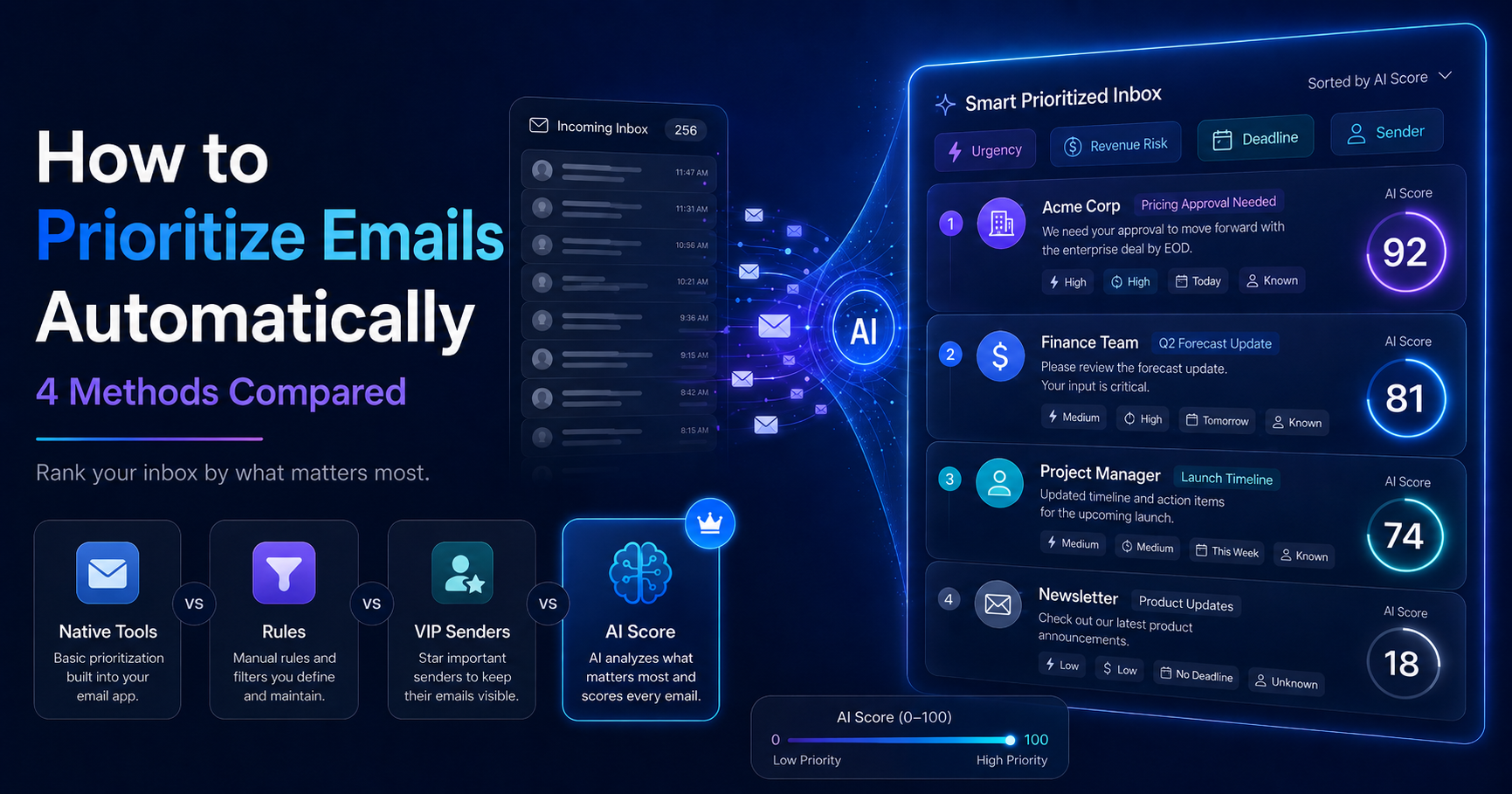
An AI decision engine is the most complete way to prioritize emails automatically because it reads the content of each message, not just the sender or subject. DailyTaskProAI scores every email 0 to 100 on four signals: urgency, revenue risk, deadline, and sender importance. The weights are adjustable, and the engine re-ranks your inbox in real time as new mail arrives.
This is the core difference from the first three methods. A native tool guesses from engagement. A rule matches fixed words. A VIP list matches people. The AI decision engine understands meaning, so it can flag a late invoice, a stalled deal, or a deadline buried in paragraph three, even when the wording is new. Our revenue risk detection flags invoices, payment delays, and deal-critical threads, and can parse PDF invoices to catch amounts and due dates.
There are two layers. Layer 0 is free rule-based scoring that runs on every sync, so you get a baseline email priority score at no cost. Layer 1 is an AI rescore that costs Credits and uses our AI Module for a deeper read. On top of scoring, the AI Decision Engine can draft replies in your voice and send you a Daily Briefing at 7 AM with your top five priorities, their AI Scores, and the day's revenue risks.
The honest limits: an AI engine needs read access to your inbox through OAuth, and the deeper AI rescore consumes Credits rather than being unlimited and free. We never store your password, full email bodies are not retained, and only snippets for your tasks are kept. For risky actions there is a hard safety rule.
Revenue risk emails are NEVER auto-sent. You always approve.
The Four Methods Side by Side
Here is how the four ways to prioritize email automatically compare on the things that matter: setup effort, whether they read meaning, deadline awareness, revenue risk, and whether you get a real priority score. Use this to match a method to your inbox.
Method Setup effort Reads meaning Deadline aware Revenue risk 0-100 priority score Native priority inbox None No No No No Manual rules and labels High, ongoing No Keyword only No No VIP sender rules Low No No No No AI decision engine Connect once Yes Yes Yes Yes
How to Choose a Method
Choose based on inbox volume and stakes. If you get light personal mail, native Priority Inbox or Focused Inbox is enough. If you get predictable mail like receipts and alerts, add a few manual rules. If your priorities map to a short list of people, VIP rules help. If money, deadlines, and deals run through your inbox, an AI decision engine with an email priority score is the only method that reads meaning.
Many people layer them. Keep filters for newsletters, keep a VIP list for your closest contacts, and put an AI decision engine on top to catch everything those static methods miss. If you want to see how AI email triage stacks up against the better-known tools, our DailyTaskProAI vs Superhuman comparison is a fair, price-accurate breakdown, and our roundup of the best AI email triage tools covers the wider field.
The short version: filters and VIP lists organize. A decision engine decides. If your inbox carries revenue, you want the method that ranks by what is at stake, not just who showed up.