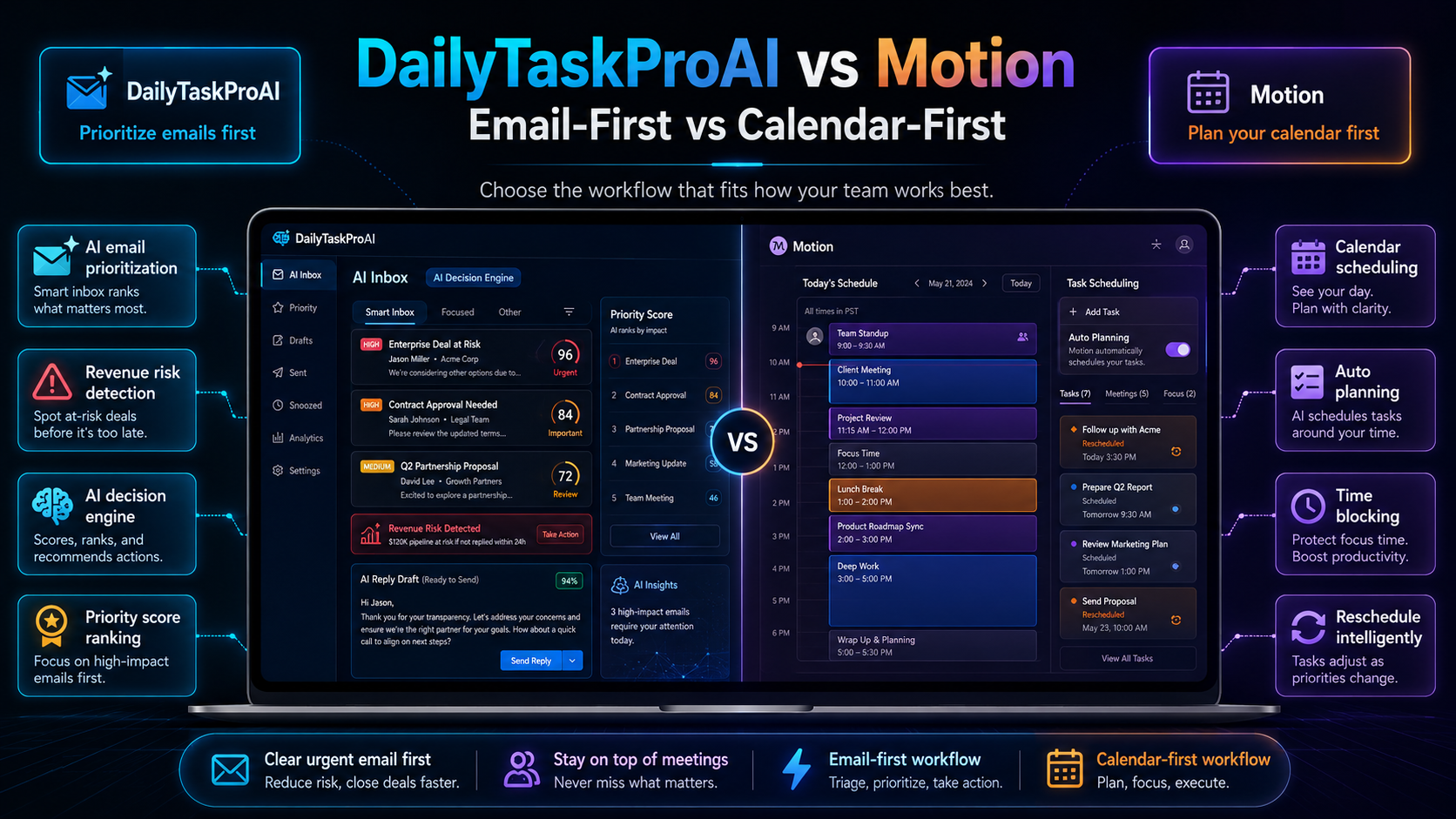
Most small teams struggle with the tension between managing emails and staying on top of their calendars. You need to respond to urgent emails while ensuring you don’t miss critical meetings. When comparing DailyTaskProAI vs Motion, understanding how each tool prioritizes these tasks can make a significant difference in your daily productivity.
DailyTaskProAI focuses primarily on email management, allowing users to score and prioritize emails to streamline their workflow. On the other hand, Motion takes a calendar-first approach, integrating tasks with your schedule. Both tools have their merits, but the right choice depends on your specific needs.
Table of Contents
DailyTaskProAI Overview
DailyTaskProAI is an AI-powered tool designed to tackle email overload. At its core is the AI Decision Engine, which scores emails on a scale of 0 to 100 based on urgency and relevance. This scoring system helps you focus on the most critical emails first, making it easier to prioritize your tasks effectively.
For example, imagine you’re a solo founder receiving dozens of emails daily. With DailyTaskProAI, your inbox is scored, and you’re alerted to high-priority messages, like a payment request or a critical client inquiry, so you can respond promptly. The tool also drafts replies in your voice, requiring your approval before sending, ensuring your tone remains consistent. Revenue risk emails are NEVER auto-sent. You always approve.
Pros:
Intuitive email prioritization through scoring.
AI auto-reply that maintains your voice.
Revenue risk detection that flags important financial emails.
Cons:
May require a learning curve for those unfamiliar with AI tools.
Focus is primarily on email, which might not suit everyone.
DailyTaskProAI is best for solo founders and small teams looking to enhance their email management. It is particularly valuable for users who deal with high volumes of emails and need a robust system to filter through them efficiently.
Motion Overview
Motion adopts a different approach by integrating your calendar with task management. This calendar-first method means that tasks are created based on your scheduled events, allowing you to see everything in one view. This is particularly useful for professionals who rely heavily on scheduling and need to align their tasks with appointments.
For instance, consider a sales team member who has multiple meetings throughout the day. With Motion, they can see their tasks aligned with each meeting, ensuring they are prepared and focused. The tool automatically adjusts your schedule, allowing for optimal time management and reducing the risk of overbooking.
Pros:
Seamless integration of tasks with calendar events.
Intelligent scheduling that adapts to changes in your day.
Great for time block enthusiasts who prioritize their calendar.
Cons:
May overlook urgent emails if not integrated effectively.
Focus on calendar could lead to neglect of email management.
Motion is ideal for teams that prioritize scheduling and need a strong focus on aligning tasks with their daily calendar. It suits busy professionals who thrive on structured schedules and need to optimize their time management.
Feature Comparison: DailyTaskProAI vs Motion
Feature Comparison:
| Feature | DailyTaskProAI | Motion | Best For |
|---|---|---|---|
| Email Prioritization | AI Decision Engine scores emails | N/A | Solo founders, teams with high email volume |
| Task Management | Integrates with email for task creation | Based on calendar events | Busy professionals with structured schedules |
| Revenue Risk Detection | Flags critical financial emails | N/A | Businesses managing invoices and payments |
| AI Auto-Reply | Drafts replies for user approval | N/A | Email-heavy roles needing quick responses |
| Integrations | Works with Gmail and Outlook | Calendar integrations | Teams using either email platform |
How to Choose
Your choice between DailyTaskProAI and Motion hinges on your workflow. If you are inundated with emails and need a structured way to manage them, DailyTaskProAI is the better option. Its AI Decision Engine provides a clear hierarchy of what needs your attention first, allowing you to focus on urgent matters without missing crucial emails.
Conversely, if you find yourself often juggling meetings and tasks, and prefer to integrate task management with your calendar, Motion may serve you better. It excels in helping you visualize your day, ensuring that you are prepared for each appointment while also keeping track of your to-dos.
FAQ: DailyTaskProAI vs Motion
What sets DailyTaskProAI apart from Motion?
DailyTaskProAI focuses on email management with features like the AI Decision Engine for prioritizing emails, while Motion emphasizes a calendar-first approach, integrating tasks with your schedule. This difference makes DailyTaskProAI ideal for those overwhelmed by email, whereas Motion suits those needing structured calendar management.
Can I integrate DailyTaskProAI with my existing email service?
Yes, DailyTaskProAI integrates seamlessly with both Gmail and Outlook. This makes it accessible for users across different platforms, ensuring you can incorporate it into your existing workflow without difficulty.
Is Motion suitable for small teams?
Yes, Motion is suitable for small teams, especially those that rely heavily on scheduling and need to sync tasks with their calendar. Its approach helps ensure that team members are aligned on appointments and tasks, promoting productivity.
What is the pricing difference between DailyTaskProAI and Motion?
DailyTaskProAI offers a free trial, with pricing plans starting at $19 per month for the Pro version and $59 per month for the Business version. Motion's pricing varies, and while it typically offers a range of options, it may not compete on value at the lower end compared to DailyTaskProAI.
How does Revenue Risk Detection work in DailyTaskProAI?
The Revenue Risk Detection feature in DailyTaskProAI flags emails that contain invoices, payment requests, or other deal-critical threads. This ensures that you never miss important financial communications, allowing you to prioritize them effectively. Importantly, revenue risk emails are NEVER auto-sent. You always approve.
Discover How DailyTaskProAI Can Streamline Your Email Management
Choosing between DailyTaskProAI vs Motion ultimately depends on your specific needs and work style. If you find yourself buried under an avalanche of emails, DailyTaskProAI offers the tools you need to regain control. With its AI-powered features and intuitive design, you can streamline your email management and enhance your productivity.
Start optimizing your workflow today. Get started free and experience how DailyTaskProAI can transform your email management process.