Businesses today face an overwhelming volume of emails, leading to delayed responses and missed opportunities. Many companies still rely on manual email responses, which can eat up valuable time and create frustration among employees. The solution? Automated email responses. By adopting this approach, businesses can significantly boost both efficiency and customer satisfaction.
Statistics indicate that companies implementing automated email responses can save up to 30% of their time on communication tasks. With around 60% of customers expecting a response within an hour, timely automated replies are becoming essential for maintaining competitive advantage.
Table of contents
1. Introduction to Automated Email Responses
Automated email responses are pre-configured replies that can be sent out to customers or contacts when they reach out via email. This technology is becoming increasingly vital as businesses look to streamline communication and improve response times. As more companies adapt to the demands of remote work, automation is projected to see a 50% increase in demand by 2026.
2. How Do Automated Email Responses Work?
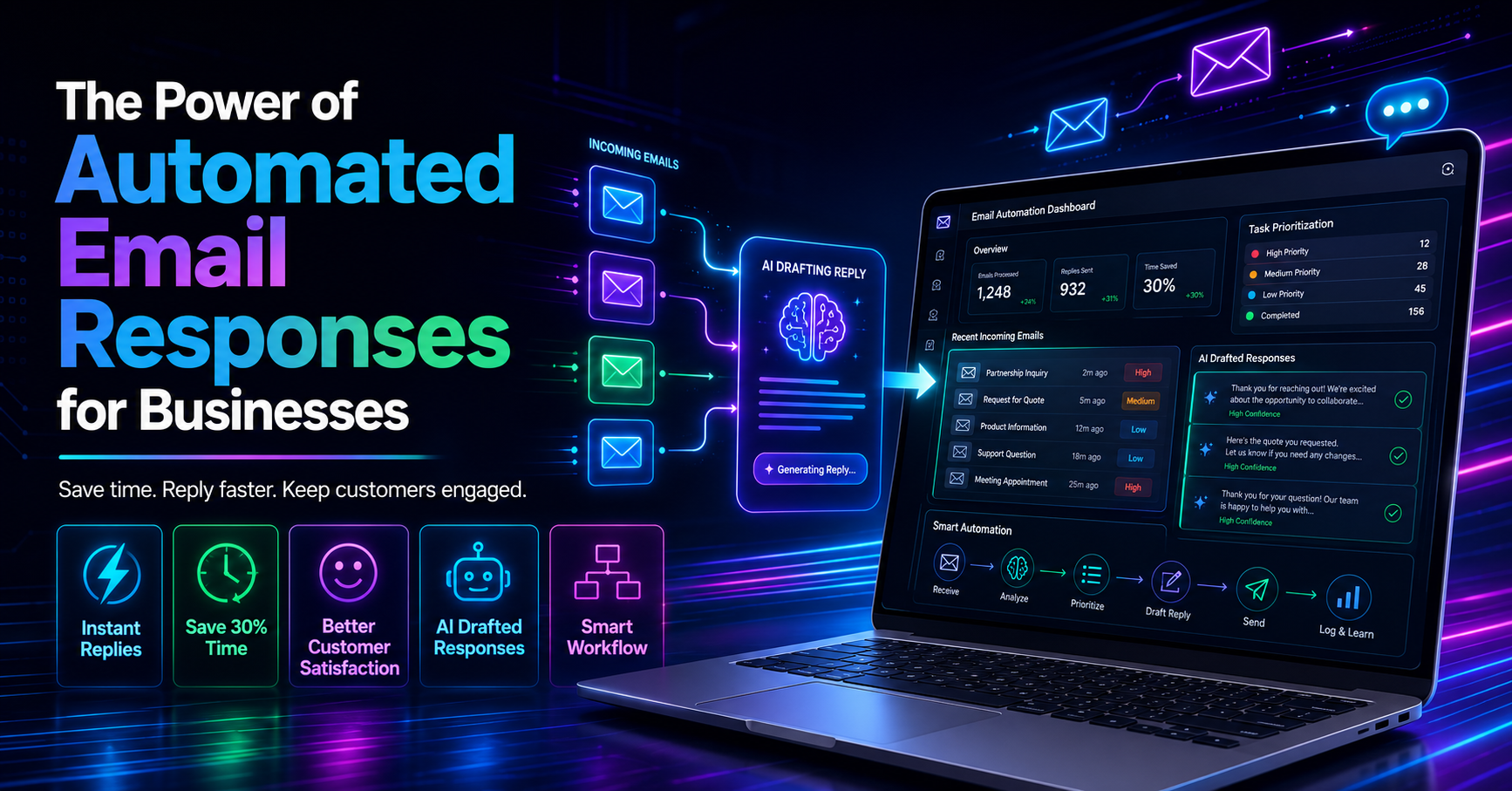
Automated email responses work by leveraging AI technologies that can read incoming emails and generate contextually relevant replies. For example, tools like DailyTaskProAI utilize an AI Decision Engine to analyze emails and draft responses in the user's voice, ensuring a personalized touch. Users can review and approve these drafts before they are sent, maintaining control over their communication.
Consider a sales team receiving inquiries about their products. Instead of waiting for a human to respond, an automated system can instantly reply with product information, availability, and pricing details, significantly reducing the time taken to engage with potential customers.
Pros: Faster response times, reduced workload, improved customer satisfaction.
Cons: Risk of generic responses, potential miscommunication if not monitored closely.
This method is best for businesses with high email volumes that need to maintain customer engagement without overwhelming their staff.
3. Benefits of Using Email Automation
Implementing automated email responses offers several key benefits that can transform the way your business operates. One of the most significant advantages is time savings. Businesses that adopt automation can cut their average response time from 24 hours to under one hour, which can lead to a 25% increase in customer satisfaction scores.
Another benefit is the ability to maintain consistent communication. For instance, if a customer sends an inquiry during off-hours, an automated response can assure them that their message has been received and that they will hear back soon. This not only enhances the customer experience but also protects your business from losing leads during critical times.
4. Can Automated Replies Improve Productivity?
Automated replies can indeed streamline communication and allow teams to focus on high-priority tasks. By reducing the time spent on routine email responses, employees can allocate more time to strategic activities that drive business growth. For example, a small e-commerce team can automate responses to order inquiries, freeing up customer service representatives to handle more complex issues.
As employees avoid burnout from repetitive tasks, overall morale improves, leading to a more productive workplace. In fact, companies that leverage email automation report higher efficiency levels, which translates into better financial performance.
Pros: Increased focus on strategic tasks, reduced employee stress, higher overall productivity.
Cons: Initial setup and integration time, possible resistance to change from team members.
This approach is ideal for teams looking to enhance operational efficiency while maintaining high levels of customer service.
5. Key Features to Look for in Email Automation Tools
When choosing an email automation tool, it's essential to look for features that enhance productivity. Key features include:
Contextual Email Replies: The ability to draft responses based on the email's content ensures personalization.
Task Prioritization: Tools like DailyTaskProAI's AI Decision Engine can score emails based on urgency and importance, guiding users on what to address first.
Calendar Auto-Scheduling: With features like Smart Calendar & Auto-Scheduling, your tool can detect meetings and deadlines from emails and seamlessly integrate tasks into your calendar.
These features collectively enhance productivity and make it easier for teams to manage their workloads effectively.
6. Setting Up Automated Email Responses
Setting up automated email responses is a straightforward process, especially with advanced tools like DailyTaskProAI. Follow these steps:
Choose Your Tool: Select a platform that offers robust automated email capabilities.
Integrate with Email: Sync your Gmail or Outlook account with the chosen tool using OAuth.
Define Triggers: Set up specific triggers for automated responses based on keywords or email types.
Draft Templates: Create templates for various scenarios, ensuring they match your brand's tone.
Review & Approve: Always review automated drafts before they are sent to ensure accuracy and appropriateness.
By following these steps, you can quickly implement automated email responses that save time and improve customer engagement.
7. Real-World Examples of Email Automation
Many businesses have successfully implemented automated email responses. For instance, a small accounting firm integrated DailyTaskProAI to handle client inquiries. They reported a 30% reduction in email response times and a significant uptick in client satisfaction. By automating routine questions about tax filings, the team was able to focus on more complex client needs.
Another example is an e-commerce company that used email automation to respond to order inquiries. This led to an increase in sales conversions, as customers received immediate confirmation and details about their purchases, which helped to build trust.
“Automated email responses have allowed us to maintain communication without sacrificing quality. Our clients appreciate the quick follow-up.” - Operations Manager, E-commerce Firm
8. FAQs About Automated Email Responses
What are automated email responses?
Automated email responses are pre-written replies that are sent automatically when a customer or contact sends an email. These responses can be tailored to specific inquiries and help businesses manage their email communication more effectively.
How do I set up automated responses?
Setting up automated responses typically involves integrating an email management tool with your email account, defining triggers for specific types of emails, and creating templates for the replies. Tools like DailyTaskProAI simplify this process significantly.
Can automated replies improve customer satisfaction?
Yes, automated replies can significantly enhance customer satisfaction by providing timely responses. With many customers expecting replies within an hour, automated responses ensure that you meet these expectations consistently.
What features should I look for in an email automation tool?
Look for features like contextual email replies, task prioritization, and calendar scheduling. These capabilities will enhance your productivity and ensure that your communication remains effective.
Are there any downsides to using automated email responses?
While automated email responses can save time and improve efficiency, they may lack personalization if not properly configured. It's important to review automated drafts to ensure they align with your brand's voice and address customer needs effectively.
Start Saving Time with Automated Email Responses Today!
In a world where email overload is common, automated email responses offer a practical solution for businesses looking to enhance efficiency and customer satisfaction. With tools like DailyTaskProAI, you can automate responses while ensuring you maintain control over your communication. Revenue risk emails are NEVER auto-sent. You always approve.
Resources & Further Reading
External Resources
How to Use AI to Improve Your Customer Service, Harvard Business Review on the impact of AI on customer service.
Why Every Business Needs an Email Automation Strategy, Forbes article discussing the necessity of email automation.
Email Marketing Statistics, Mailchimp's insights on email marketing trends.